Mobile Deeplinks
The Nunu SDK uses custom URL schemes (deeplinks) to launch your app and pass connection info for test sessions. These schemes are:
el://elx://els://
Automatic Configuration
When USE_NUNU_SDK is defined, the SDK’s post-build scripts automatically configure deeplinks during the build process. No manual setup is required.
The post-build scripts:
- Android: Adds intent filters to
AndroidManifest.xmlfor all three URL schemes - iOS: Registers URL schemes in
Info.plist
The scripts also embed SDK metadata (version, enabled state) into the build artifacts.
When USE_NUNU_SDK is not defined, the post-build scripts automatically clean
up any previously configured deeplinks and metadata.
Android
Architecture Requirements
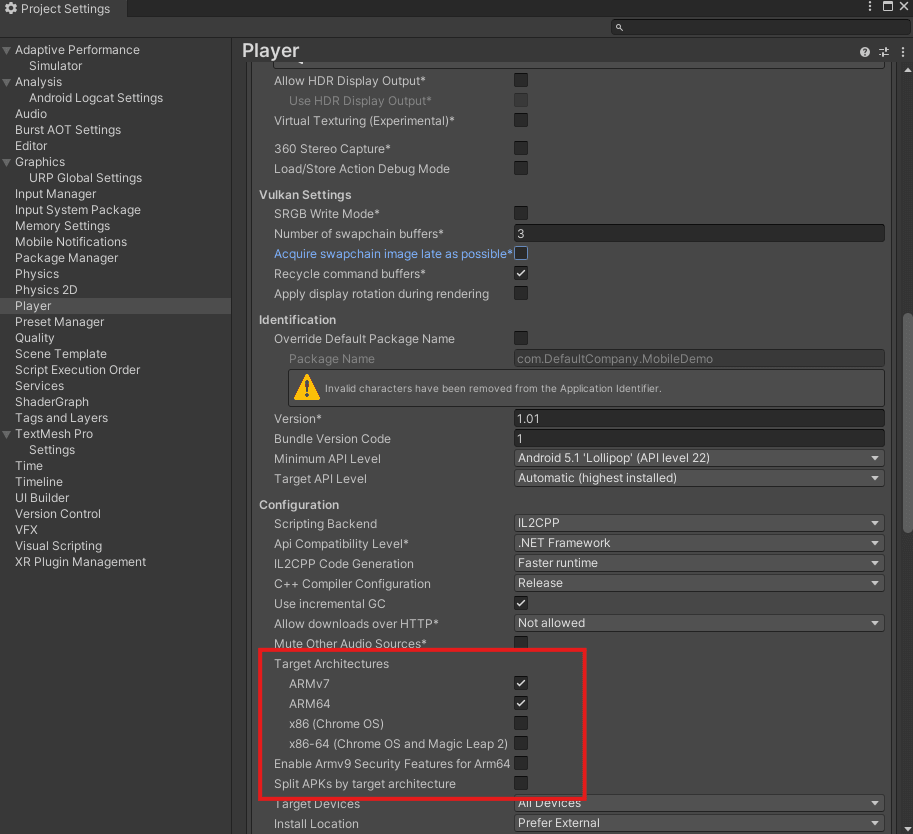
Android builds must support ARM64 (AArch64) architecture. Please provide either universal builds (supporting both architectures) or ARM64-specific builds, as we cannot accept builds that only support ARMv7.
What Gets Configured
The post-build script adds the following intent filter to your main activity:
<intent-filter>
  <action android:name="android.intent.action.VIEW" />
  <category android:name="android.intent.category.DEFAULT" />
  <category android:name="android.intent.category.BROWSABLE" />
  <data android:scheme="els" />
  <data android:scheme="elx" />
  <data android:scheme="el" />
</intent-filter>
It also adds metadata to track SDK status:
<meta-data android:name="ai.nunu.sdk.enabled" android:value="true" />
<meta-data android:name="ai.nunu.sdk.version" android:value="..." />
Some CI/CD pipelines may override the generated AndroidManifest.xml. If
deeplinks aren’t working, verify your pipeline preserves the post-build
modifications or manually add the intent filters.
Internet Permission
The SDK requires internet access to communicate with the test infrastructure. Ensure your AndroidManifest.xml includes the internet permission:
<uses-permission android:name="android.permission.INTERNET" />If the SDK fails to connect, a missing internet permission is often the cause.
iOS
What Gets Configured
The post-build script adds URL scheme entries to Info.plist:
<key>CFBundleURLTypes</key>
<array>
  <dict>
    <key>CFBundleTypeRole</key>
    <string>Editor</string>
    <key>CFBundleURLName</key>
    <string>ai.nunu.sdk</string>
    <key>CFBundleURLSchemes</key>
    <array>
      <string>els</string>
      <string>elx</string>
      <string>el</string>
    </array>
  </dict>
</array>
It also adds metadata keys:
NunuSDKEnabled: Boolean indicating if SDK is activeNunuSDKVersion: SDK version string
Some CI/CD pipelines may not preserve Unity’s Info.plist modifications. If
URL schemes aren’t working, verify your pipeline configuration or add them
manually.