Intro to NunuSDK
The Nunu SDK provides a comprehensive framework that enhances AI agent capabilities in any game, specifically designed for development and testing environments while being easily excludable from production builds.
What does the Nunu SDK do?
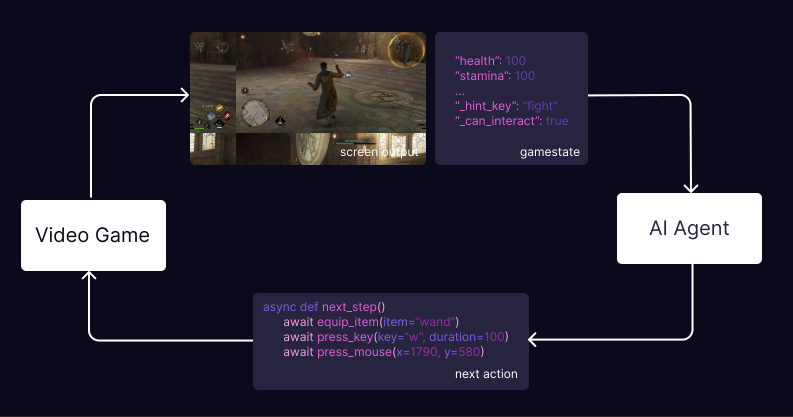
At its core, the SDK enables two-way communication between AI and games:
- Game to AI: The SDK allows your game to send information to the AI agent, including game state, logs, and performance metrics. This information is crucial for the agent to understand the game environment and make informed decisions.
- AI to Game: The SDK enables the AI agent to send commands (flayer functions) to your game, such as moving the player, interacting with objects, or performing specific actions.
Why Do We Need the SDK?
The SDK’s primary purpose is making AI agents more capable and reliable in game environments, particularly for challenging tasks:
- 3D Navigation: AI agents often struggle with complex 3D navigation and camera control. The SDK provides helper functions that make these tasks more manageable.
- Complex Interactions: Some game interactions require precise timing or multiple steps that are difficult to achieve reliably with just basic inputs.
- Enhanced Observation: Beyond simple screenshots, the SDK enables direct access to game state information, giving agents a clearer understanding of the game environment and state.
Flayer Functions (Game Functions)
The heart of the SDK’s enhanced capabilities lies in Flayer functions. Developers can expand the AI agent’s capabilities by exposing functions from the game to the agent. The SDK provides a straightforward framework for writing these functions, allowing developers to:
- Quickly implement new capabilities
- Leverage existing game code
- Create simple, focused functions that handle specific tasks
Flayer functions serve as building blocks for the agent, which can combine them in creative ways to accomplish complex goals.
Check out the Flayer Functions section for more details
Additional Benefits
Implementing the SDK also brings several other advantages:
The SDK provides comprehensive exception logging from within the game, complete with timestamps. This makes it easy to identify and debug issues when reviewing recordings.
Track key metrics during gameplay:
- Frame rates (FPS)
- Memory utilization
- CPU/GPU usage
- Custom game-specific metrics
All these metrics are available in recordings for later analysis.
Check out the Performance Tracking section for more details
SDK Options
Currently, we provide SDKs for two major game engines: