Overview of TestRail Integration Setup
This feature is currently in beta. If you’re interested in trying it out, please contact us.
Overview
The TestRail integration allows you to link your Nexus test cases to TestRail test cases and export test run results to TestRail. This creates a seamless connection between your automated testing in Nexus and your test management in TestRail.
What you can do:
- Connect Nexus to your TestRail instance
- Link TestRail cases to Nexus tests (at the test or step level)
- Export test results to TestRail with automatic status mapping
- Track sync status between Nexus and TestRail
Prerequisites
Before setting up the integration, ensure you have:
- A TestRail account with API access enabled
- A TestRail API key with the following permissions (inherits from your user):
- Read access:
get_projects,get_suites,get_cases,get_sections,get_statuses - Write access:
add_run,add_plan,add_results_for_cases,close_run,close_plan - If you can do these actions via the TestRail web interface, your API key should have the necessary permissions.
- Read access:
- The
project:edit-configspermission in Nexus (orproject:admin/org:admin)
Connecting to TestRail
Navigate to TestRail Configuration
Go to Configs → TestRail in your Nexus project.
If you don’t see the TestRail option, either the feature is not enabled for
your project or you don’t have the required project:edit-configs permission.
Enter Connection Details
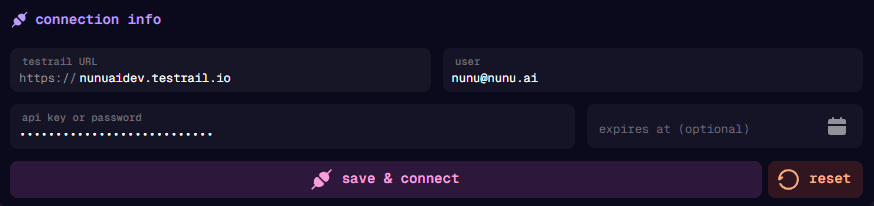
Fill in your TestRail connection information:
| Field | Description |
|---|---|
| TestRail URL | Your TestRail instance URL (e.g., company.testrail.io) |
| User | Your TestRail email address |
| API Key | Your TestRail API key |
Save and Connect
Click Save & Connect to establish the connection. Nexus will verify your credentials and connect to your TestRail instance.
Selecting Project and Suites
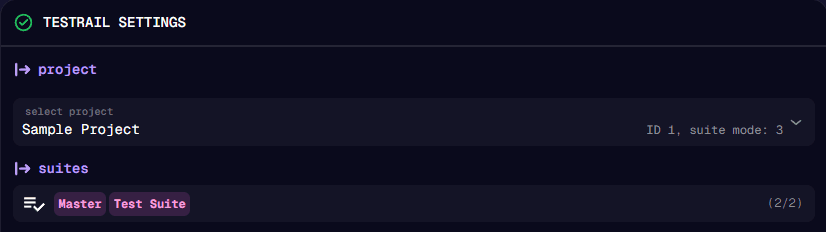
After connecting successfully, configure which TestRail data to use:
Project Selection
Choose the TestRail project that corresponds to your Nexus project. You can only link cases from a single TestRail project per Nexus project.
Suite Selection
Select one or more test suites from your TestRail project:
- Search for suites by name using the search field
- Use Select All or Clear for bulk operations
- Only test cases from selected suites will be available for linking
Only test cases from the selected suites will be available when linking cases to your tests. If you can’t find a case, check that its suite is configured here.
Configuring Status Mapping
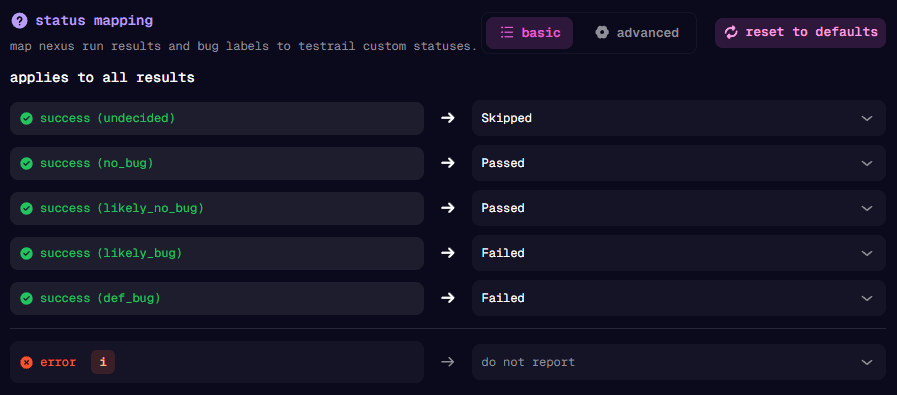
Status mapping determines how Nexus test results are reported to TestRail.
Understanding Nexus Results
When a test runs in Nexus, it produces:
- A run result: Success, Stopped, MaxSteps, or Error
- A bug label: NoBug, LikelyNoBug, Undecided, LikelyBug, or DefinitelyBug
Mapping Modes
Basic Mode
Basic mode (recommended for most users) maps each bug label to a TestRail status. The same mapping applies to all run results (Success, Stopped, MaxSteps).
Advanced Mode
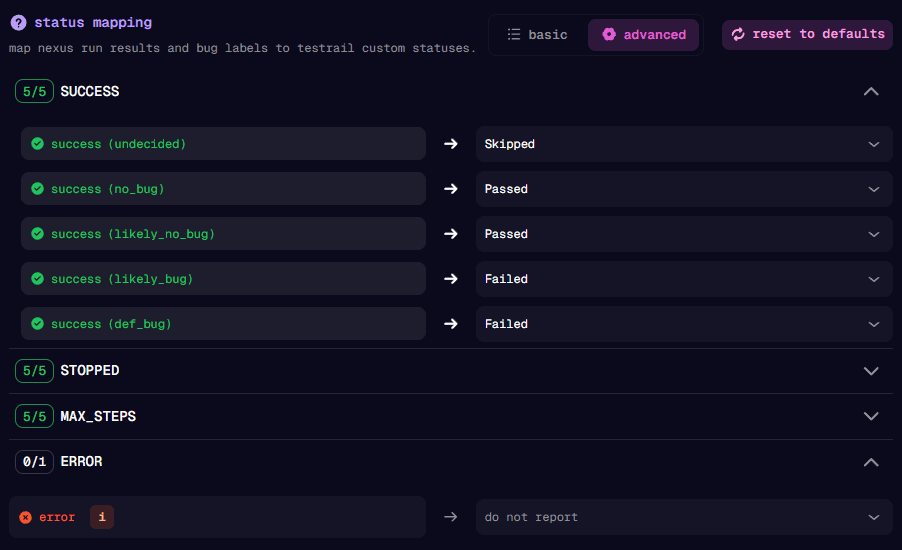
Advanced mode lets you create different mappings for each run result type. This is useful if you need granular control over how different scenarios are reported.
Default Mapping
If you don’t configure custom mappings, Nexus uses these defaults:
| Nexus Result | TestRail Status |
|---|---|
| No Bug | Passed (1) |
| Likely No Bug | Passed (1) |
| Undecided | Retest (4) |
| Likely Bug | Failed (5) |
| Definitely Bug | Failed (5) |
| Error (run result) | Not reported |
Error results are not reported to TestRail because they typically indicate setup or configuration issues rather than actual test failures.
You can reset to these defaults at any time by clicking Reset to Defaults.
Required Permissions
| Action | Required Permission |
|---|---|
| Configure TestRail integration | project:edit-configs, project:admin, or org:admin |
| Link cases to tests | project:edit-tests (or any of the above) |
| Export results | Any authenticated user with access to view runs |
Next Steps
Once TestRail is configured, you can start linking test cases to your Nexus tests.
Continue to Linking TestRail Cases to learn how to connect your tests to TestRail cases.