Live View
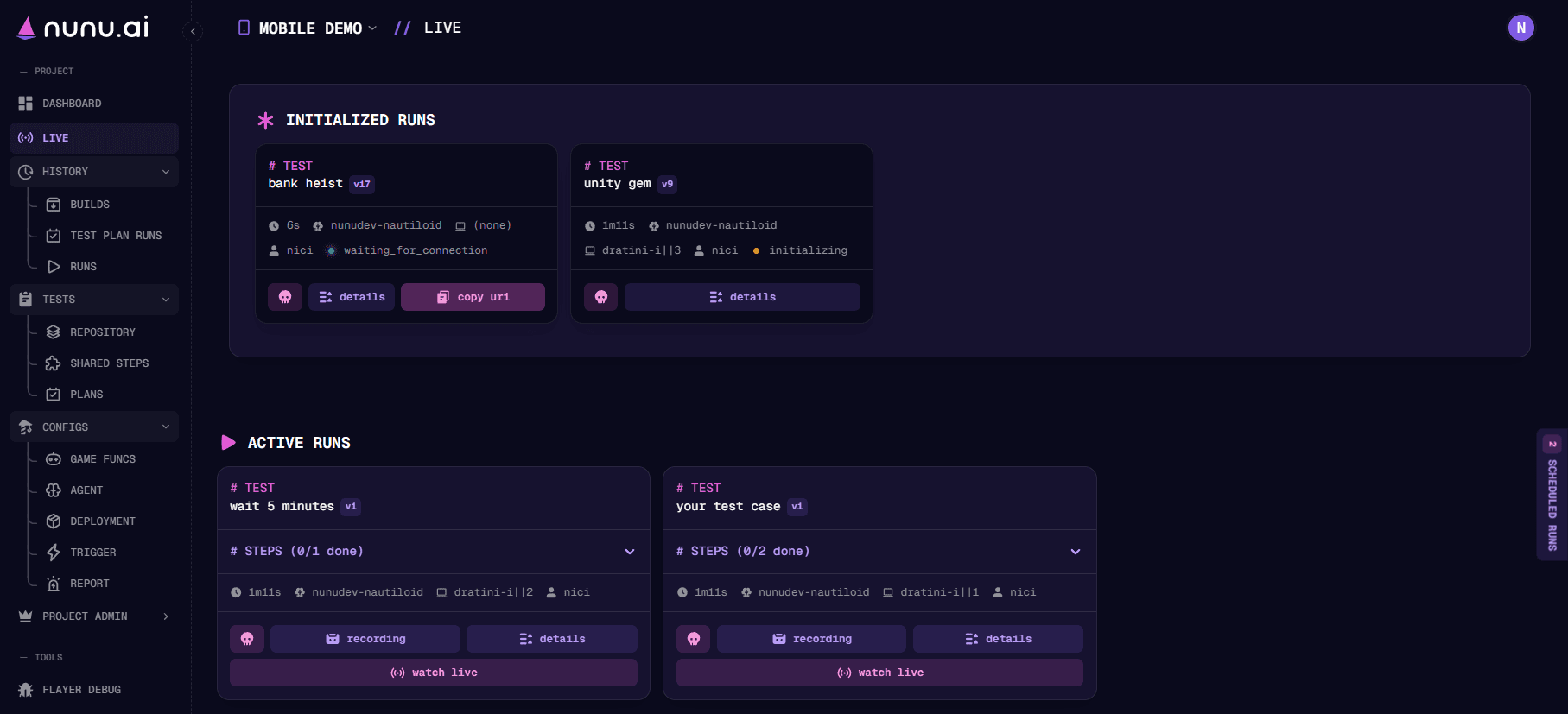
Live View shows your project’s current test activity: runs in setup or teardown, active runs, and scheduled jobs waiting in the queue.
Setup and Teardown
The setup & teardown section shows runs preparing to execute or finishing up after execution. Each run card shows its current setup or cleanup stage.
- Setup prepares the test environment and connects the AI agent. For device runs, this includes downloading and installing your build and launching the game.
- Teardown uploads run artifacts and cleans up the test environment, releasing the device or session for other runs.
Once setup completes, the run appears under Active Runs. After teardown, you can review the results in History → Runs.
Active Runs
Active Runs shows tests currently executing. Run cards show elapsed time and test-step progress. Expand Steps to see which steps are complete and what the agent is working on.
Use the controls on a run card to:
- watch live: Follow the run and interact with the agent in real time.
- recording: Review the recording so far.
- details: Open Run Details to inspect metadata, steps, and artifacts.
- kill run: Stop the run.
Queue
The queue lists scheduled test jobs waiting to start. Expand Queued Runs at the bottom of Live View to inspect them. The status column shows why a job is waiting; hover over its label for more detail.
Common waiting reasons include:
| Status | What it means |
|---|---|
| PROJECT DEVICE LIMIT / ORG DEVICE LIMIT | The project or organization is using all its concurrent device slots. The job waits for other runs to release capacity. |
| PLATFORM CAPACITY | All machines for the selected platform are busy. The job waits for one to become available. |
| PROJECT CREDIT LIMIT / ORG CREDIT LIMIT | The applicable credit balance or limit is exhausted. Credits must be available before the job can start. |
| WAITING FOR BUILD | The build selected for the job is still pending. The job waits for it to become available. |
| ACCOUNT IN USE | An account requested by the job is in use by another run. The job waits for the account to be released. |
| DEVICE IN USE | The selected device is busy. This usually applies to private devices or local devices (minions). The job waits for it to be released. |
| DEVICE UNAVAILABLE | The selected device is unavailable. Check its availability and the job’s deployment configuration. |
QUEUED means the scheduler is evaluating the job, and STARTING means execution is beginning. Waiting jobs are checked again automatically and start when their requirements are met. You can also select queued jobs and choose stop to cancel them.
See Usage and Credits for device capacity and credit limits.
Watch Live
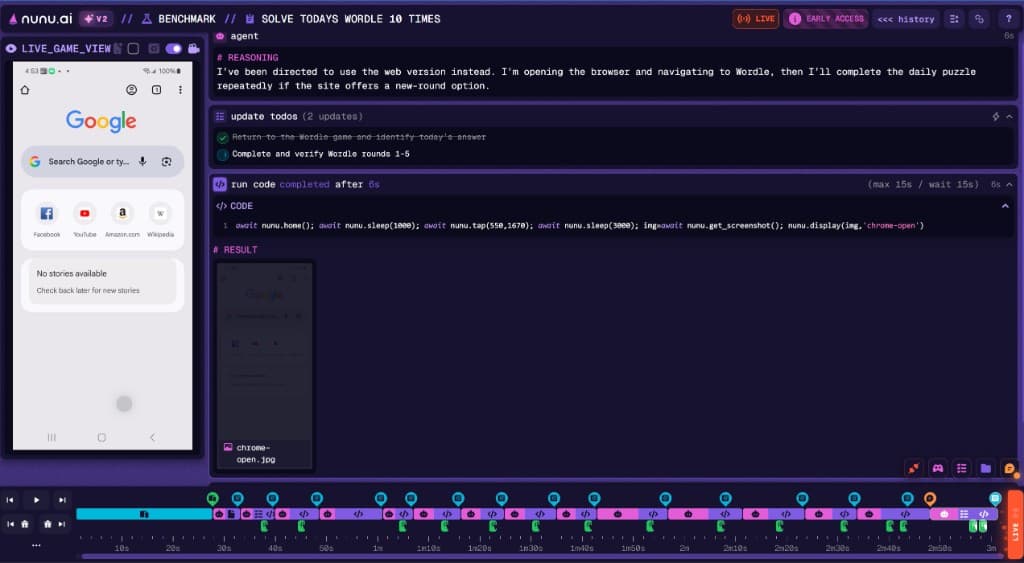
Click watch live on an active run to follow the agent’s activity as it executes your test. The live run view shows the game and the agent’s progress, with chat and device interaction controls for guiding the session.
Live Chat
Use Live Chat to ask quick questions, provide hints, or steer the session while the test is running. Enter a message in the agent’s chat panel and press Enter or click the send button.
Example messages:
- “What are you trying to do right now?”
- “The settings menu is behind the gear icon at the top right.”
- “Select ‘play as guest’, then continue with the tutorial.”
- “Run the following cheat command: run_cheat(arg1=‘win_game’).”
Live Chat is useful for debugging test scenarios or helping the agent through an unexpected situation.
Manual Device Interaction
Use the interaction toggle on supported live streams to take direct control of the session from your browser. This lets you change settings, enter information, or put the game into a state you want the agent to test.
- Open watch live for the active run.
- In LIVE_GAME_VIEW, enable video to show the live stream, then enable the interaction toggle highlighted below.
- Use your mouse to tap, swipe, or drag directly on the preview.
- Turn off the interaction toggle when you finish to return to watching the session.
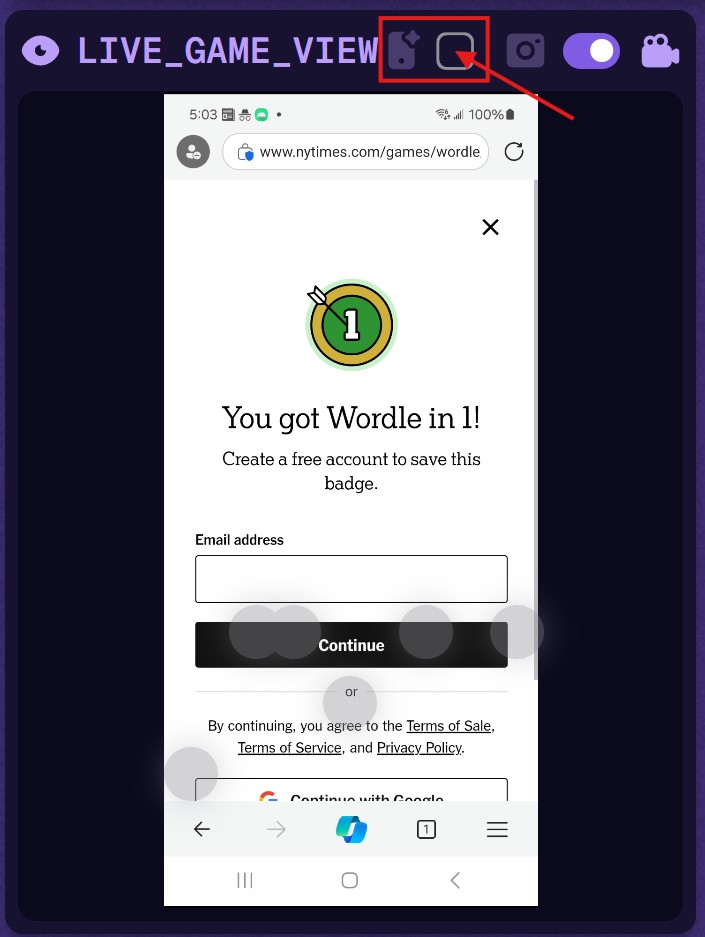
Your inputs act on the same device or browser session the agent is testing, so changes you make are visible to the agent.