How to Enable/Disable the Unity SDK
The Nunu SDK uses a C# compiler define symbol (USE_NUNU_SDK) to control whether the SDK is included in your builds. This is a standard Unity feature that controls which code gets compiled.
When the symbol is present:
- The full SDK compiles and initializes normally
- All SDK features are available at runtime
- The SDK bootstraps itself before the first scene loads — no prefab or scene component required — and creates one hidden, persistent host for its lifecycle callbacks and optional UI
When the symbol is missing:
- SDK code is completely excluded from compilation using
#if USE_NUNU_SDKdirectives - The bootstrap does not run, so nothing is added to your scenes
You can also use the USE_NUNU_SDK symbol in your own code to conditionally include or exclude code related to Nunu SDK integration.
#if USE_NUNU_SDK
// Code that only needs to run when the Nunu SDK is enabled
CheatManager.EnableAll();
#endif
This way you can ensure that your game compiles without any custom functionality made for Nunu in builds where the SDK is disabled.
Developing in the Editor
This is the fastest way to enable or disable the SDK during development:
- In Unity’s top menu, click Tools → Nunu SDK → Active Status
- Look for the checkmark:
- ✓ Checkmark visible = SDK is enabled
- ✗ No checkmark = SDK is disabled
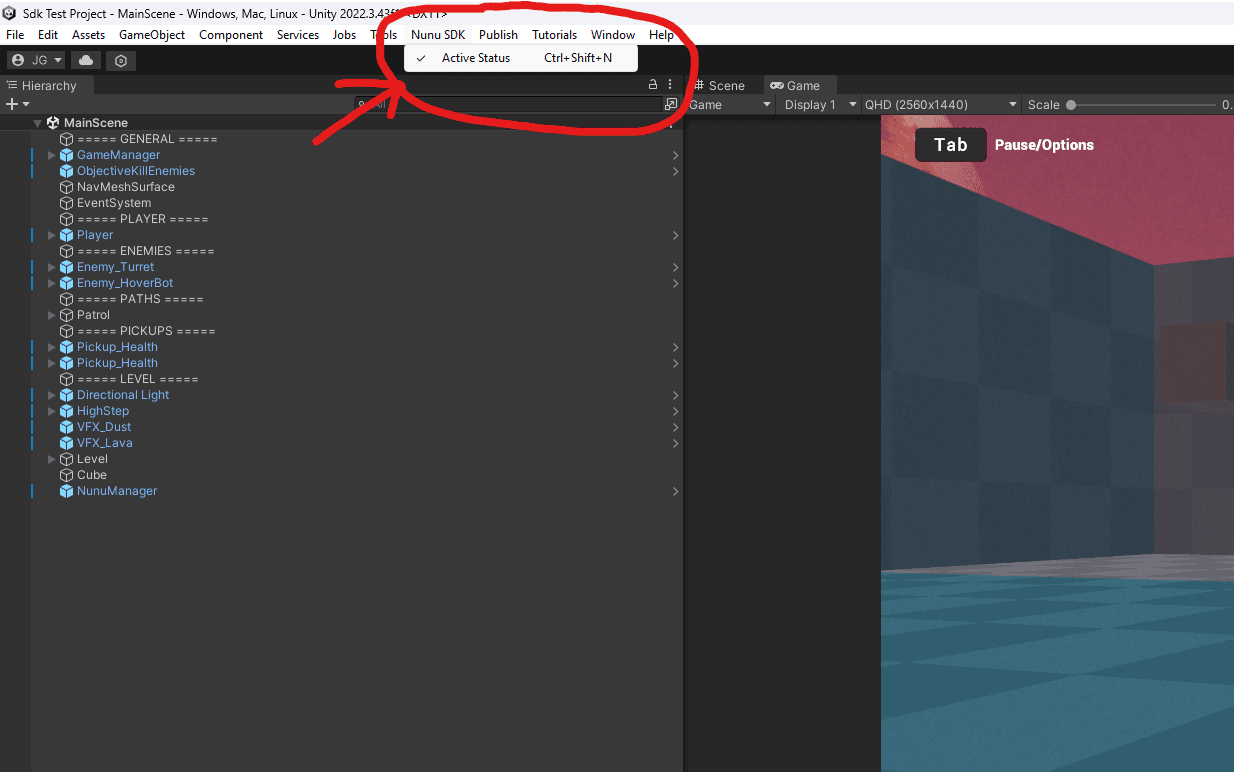
After toggling, you may need to reopen your script files in your IDE for syntax highlighting to update.
Using Version Control
When using version control like GitHub, GitLab, or Bitbucket, you can commit the SDK configuration as either enabled or disabled. Each approach has trade-offs to consider.
The SDK enabled/disabled state is stored in ProjectSettings/ProjectSettings.asset. This is the file that should be committed to version control to share the configuration across your team.
Option 1: Commit with SDK Enabled
Advantages:
- Catches integration errors early as the code is always analyzed by Unity and the IDE
- When developers change code, the IDE will highlight errors and warnings related to the SDK
- Ensures SDK compatibility is maintained across the team
Disadvantages:
- Easier for CI/CD pipelines to accidentally include the SDK in production builds
- It’s always active during development in the Editor
Option 2: Commit with SDK Disabled
Advantages:
- Safer default for production builds
Disadvantages:
- Compiler errors related to the SDK may only be detected at build time
- Developers must manually enable the SDK to test integration code
Production vs Development Builds
⚠️ Always Disable the SDK in Production Builds
The Nunu SDK is designed for internal testing and QA workflows only. It should never be included in builds that ship to end users.
Why this matters:
- The SDK opens network connections for automated testing
- It exposes debug functionality that could be abused
- It adds unnecessary overhead to production builds
To properly configure your CI/CD pipeline check out the following page: CI/CD Configuration