Logs & Artifacts
After a test run completes, open Run Details → Artifacts to browse and download its logs and files.
Device Log
The device log captures system-level output from the device during the test:
- Android: Logcat output
- iOS: Syslog output
This is useful for debugging app crashes, performance issues, or understanding what happened during a test.
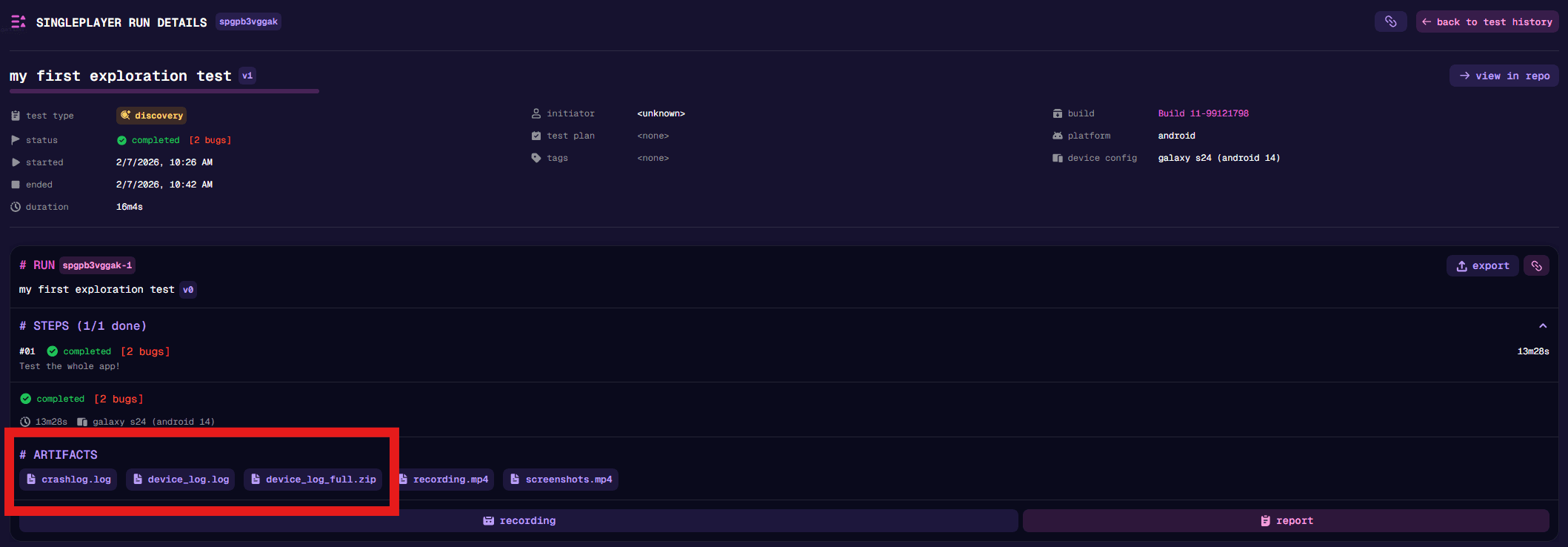
Crash Log
If your app crashes during a test, a separate crash log is generated with the crash details. This includes stack traces and other diagnostic information.
Recording and screenshots
Each run is recorded to an mp4 file, which you can view or download from the artifacts. Additionally, the screenshots
that the agent sees are also captured and packaged in screenshots.mp4, this allows you to view the
run through the agent’s eyes.
Custom Artifacts
You can have your app write files that get automatically uploaded to the run artifacts. This is useful for:
- Custom log files
- Screenshots taken by your app
- Debug data or state dumps
- Any other files your app generates during testing
Android Setup
Write files to the nunu_artifacts folder in your app’s external app storage:
/storage/emulated/0/Android/data/<your.package.name>/files/nunu_artifacts/val artifactsDir = File(getExternalFilesDir(null), "nunu_artifacts")
artifactsDir.mkdirs()
val logFile = File(artifactsDir, "custom_log.txt")
logFile.writeText("Your log content")File artifactsDir = new File(getExternalFilesDir(null), "nunu_artifacts");
artifactsDir.mkdirs();
File logFile = new File(artifactsDir, "custom_log.txt");
Files.writeString(logFile.toPath(), "Your log content");import 'dart:io';
import 'package:path_provider/path_provider.dart';
final externalDir = await getExternalStorageDirectory();
if (externalDir != null) {
final artifactsDir = Directory('${externalDir.path}/nunu_artifacts');
await artifactsDir.create(recursive: true);
final logFile = File('${artifactsDir.path}/custom_log.txt');
await logFile.writeAsString('Your log content');
}using System.IO;
using UnityEngine;
var artifactsDir = Path.Combine(Application.persistentDataPath, "nunu_artifacts");
Directory.CreateDirectory(artifactsDir);
var logFile = Path.Combine(artifactsDir, "custom_log.txt");
File.WriteAllText(logFile, "Your log content");iOS Setup
Write files to Documents/nunu_artifacts in your app sandbox.
let documents = FileManager.default.urls(for: .documentDirectory, in: .userDomainMask).first!
let artifactsDir = documents.appendingPathComponent("nunu_artifacts", isDirectory: true)
try? FileManager.default.createDirectory(at: artifactsDir, withIntermediateDirectories: true)

let logFile = artifactsDir.appendingPathComponent("custom_log.txt")
try? "Your log content".write(to: logFile, atomically: true, encoding: .utf8)import 'dart:io';
import 'package:path_provider/path_provider.dart';
final documentsDir = await getApplicationDocumentsDirectory();
final artifactsDir = Directory('${documentsDir.path}/nunu_artifacts');
await artifactsDir.create(recursive: true);
final logFile = File('${artifactsDir.path}/custom_log.txt');
await logFile.writeAsString('Your log content');using System.IO;
using UnityEngine;
var artifactsDir = Path.Combine(Application.persistentDataPath, "nunu_artifacts");
Directory.CreateDirectory(artifactsDir);
var logFile = Path.Combine(artifactsDir, "custom_log.txt");
File.WriteAllText(logFile, "Your log content");For iOS artifact pulling to work, ensure these keys are set in your app Info.plist:
<key>UIFileSharingEnabled</key>
<true/>
<key>LSSupportsOpeningDocumentsInPlace</key>
<true/>
What these keys do:
UIFileSharingEnabled: Enables file sharing for the app’sDocumentsdirectory (Finder/iTunes file sharing). This is what allows iOS document vending to work for custom artifact pulling.LSSupportsOpeningDocumentsInPlace: Lets the system work with documents in-place instead of requiring copies.
If these keys are missing we won’t be able to see or pull the artifacts
How It Works
- Artifacts are pulled after the test completes but before the device session ends
- Files are collected once at the end of the test (not continuously synced)
- Empty folders are skipped
- If session cleanup fails early, artifacts may not be retrieved
- Uploaded files from both Android and iOS appear under the
nunu_artifacts/folder in run artifacts
Subdirectories are supported and preserved.
Best Practices
- Keep file sizes reasonable to avoid slow uploads
- Use descriptive filenames to easily identify artifacts
- Clear the folder between test runs if reusing the same device