Knowledge Base
Knowledge Base is not enabled by default
This is a limited access feature. Contact the nunu team to enable it for your project.
The Knowledge Base allows you to provide agents with additional context and information to enhance testing or guide specific tasks. Agents can read and query these files during runtime to make better decisions and follow your specifications.
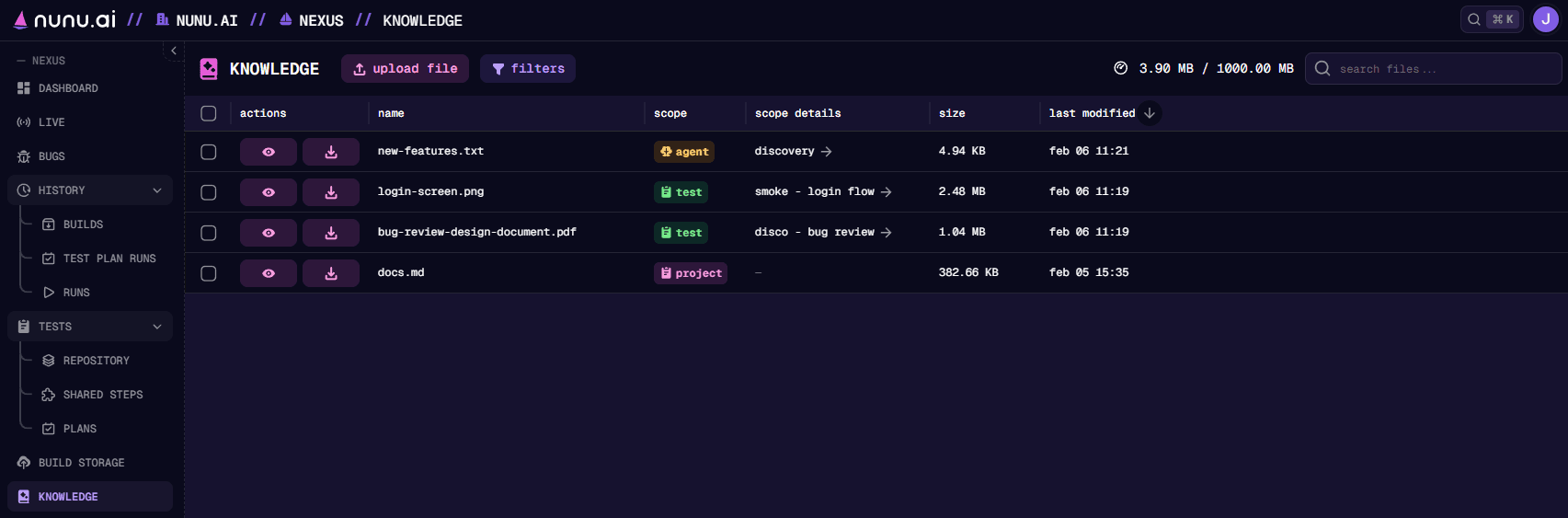
Knowledge files exist in the agent’s virtual filesystem, not on the device being tested. The agent can read and query these files, but cannot transfer them to the device or use them as input files within the application under test.
Supported File Types
| Type | Formats | Limits |
|---|---|---|
| Text | .css, .env, .html, .ini, .log, .md, .py, .toml, .txt, .xml, .yaml, .yml | 10 MB; 500,000 characters |
| Data | .csv, .json, .tsv | 10 MB; 500,000 characters |
| Images | .png, .jpg, .jpeg | 5 MB |
| PDFs | .pdf | 10 MB; 50 pages |
| Office documents | .docx, .pptx, .xlsx | 10 MB |
Agents can read text, images, and PDFs directly from their workspace.
Adding Files
Open Knowledge and click upload knowledge file, or drag a file onto the table. Choose the project, agent, or test scope, enter a file name and description, and add optional keywords.
To write a text or data file directly in Nexus, click new file, enter a file name with a supported extension, and write or paste its content. Choose its scope, add a description, and click Create.
File Organization Best Practices
Good file organization helps agents find relevant information quickly and reduces unnecessary lookups.
Naming
Use descriptive file names that indicate the content:
| ✓ Good | ✗ Avoid |
|---|---|
checkout-flow-spec.pdf | doc1.pdf |
user-registration-requirements.md | requirements.md |
level-3-boss-mechanics.txt | notes.txt |
Files at different scopes can share the same name since they exist in separate directories.
Description
When uploading a file, provide a clear description (3-4 sentences) that explains:
- What the file contains
- When the agent should reference it
- Any relevant keywords for search
Split large documents into smaller, focused files. Multiple well-named documents are easier to search than one large file, and help agents find exactly what they need without loading unnecessary context.
Knowledge Scopes
Knowledge files can be attached at three different levels, each serving different purposes:
Project Knowledge
Files uploaded to the Knowledge tab are available to all agents and tasks in your project. Use this for information that applies broadly across your testing.
Best for:
- Game design documents
- Product documentation
- Style guides and brand guidelines
- API documentation
- General user/game guides
Agent Knowledge
Files attached directly to an agent are available whenever that agent runs, regardless of which task it’s executing.
Best for:
- Agent-specific instructions or personas
- Reference materials for a particular testing focus
 In the above example, we for example curate a list of new features that the agent should focus on during exploration tests. This allows us to ensure that this specific agent is always testing the latest features and giving them more attention.
Task/Test Knowledge
Files attached to a specific task or testcase are only available during that task’s execution.
Best for:
- Task-specific instructions
- Questionnaires to fill out
- Feature specs for targeted testing
- Reference images for visual validation
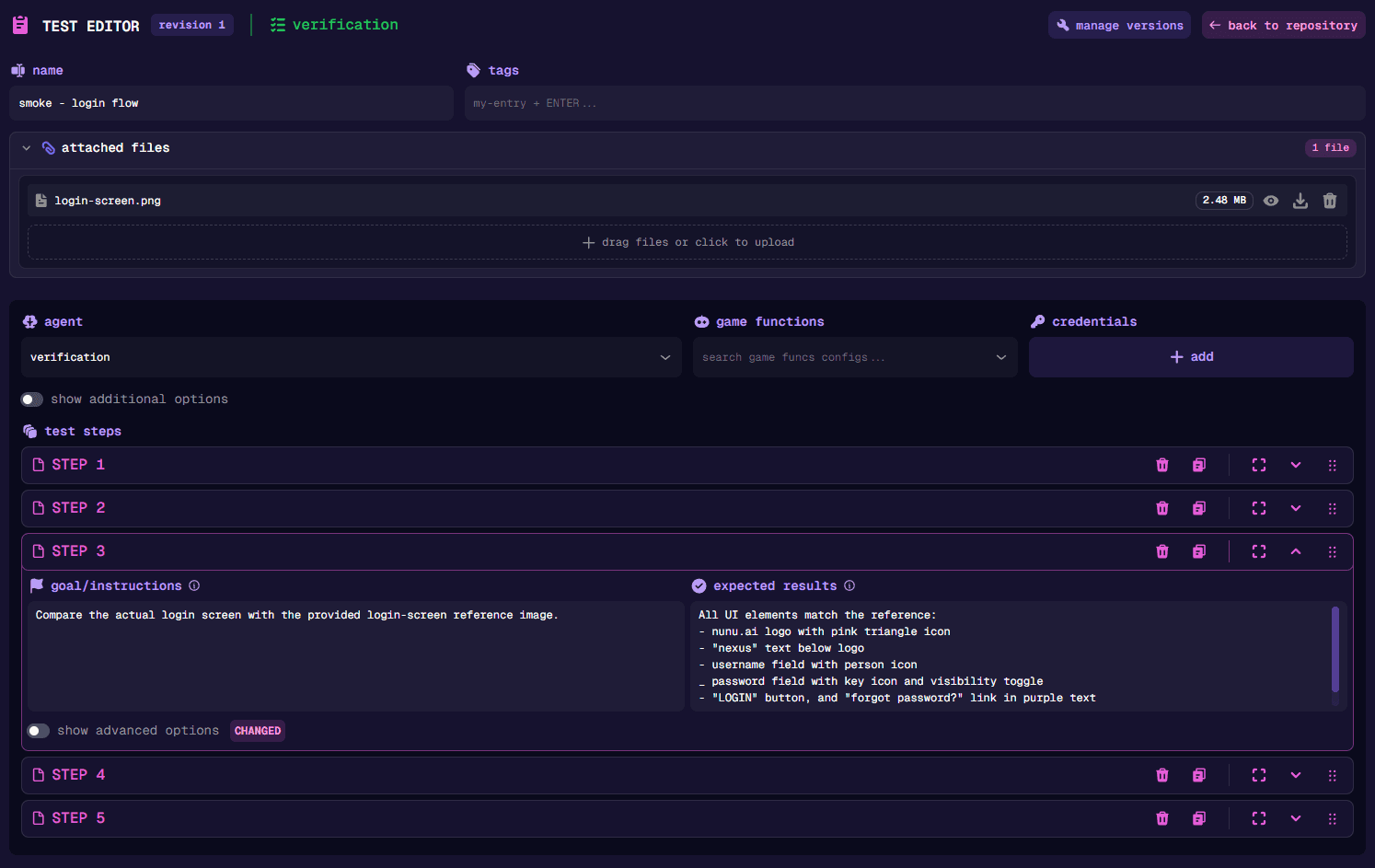
You must first create and save the test case before you’ll see the option to upload any documents. This is due to our current implementation, which requires the test case to already exist before documents can be attached.
Memory
Beyond the files you upload, agents can create memory files during runs — notes they persist and read back on later runs of the same test, so they carry learnings forward (for example, how to get past a known-tricky step). Memory is part of the Knowledge Base feature and lives in the same virtual filesystem.
Memory is controlled at two levels:
- Project default — under Project Settings → Features → Knowledge, the memory toggle sets whether agents may read and write memory by default. It applies to every test left on auto. Project admins can change this toggle whenever the Knowledge Base is enabled.
- Per-test override — each test case has a disabled / auto / enabled
control next to the memory label in the test editor. Auto inherits the
project default; disabled and enabled override it for that test. Over the
API this is
the
memoryfield.
Enabling or disabling the Knowledge Base feature itself is managed by nunu staff. Project admins control the memory toggle (and per-test overrides) once it’s enabled. When the Knowledge Base feature is disabled for a project, memory is always off, regardless of the per-test setting.
Use Cases
Testing Against a Feature Spec
Attach a feature specification document to a discovery test and instruct the agent to test according to the attached documentation.
Test the checkout flow according to the attached feature-spec.pdf.
Verify all acceptance criteria are met.
Form Filling with Questionnaires
Attach a questionnaire or data template to a task and have the agent complete it.
Fill out the survey using the questions in survey-template.md
and export the results as answers.pdf.
Visual Reference Testing
Attach reference images showing expected UI states for the agent to compare against.
Verify the dashboard matches the design in dashboard-mockup.png.
Check that all elements are positioned correctly.
Game Testing with Design Documents
Upload game design documents as project knowledge so all agents understand game mechanics, progression systems, and expected behaviors.