Test Plan Runs
Test Plan Runs is not enabled by default
Contact your project admin to enable this feature, or learn how to enable it yourself if you have admin access.
The Test Plan Runs view provides an overview of your test plan executions and their results. It helps you track the success rate and outcomes across different test plans over time.
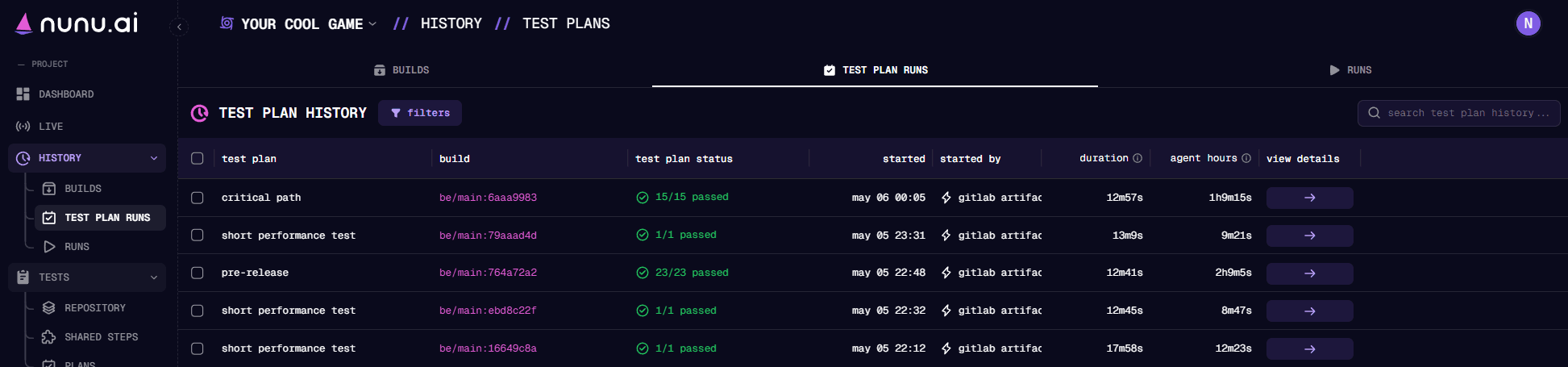
Test Plan History
The Test Plan History table provides a comprehensive overview of all your test plan executions, showing the following columns:
- test plan: The name of the test plan that was executed.
- build: The build on which the test plan was run.
- test results: How many tests have run in this plan and how many have passed.
- started: Time when the test plan execution began.
- started by: Who initiated the test plan execution.
- duration: How long the test plan execution took to complete, calculated as end time minus start time.
- agent hours: Total amount of time it took to run the test plan.
- view details: Shows you all tests that have been run in this test plan.
If you have multiple AI Agents available, tests can be run in parallel. This reduces the duration of the test plan execution.
Last updated on